
What is GPA?
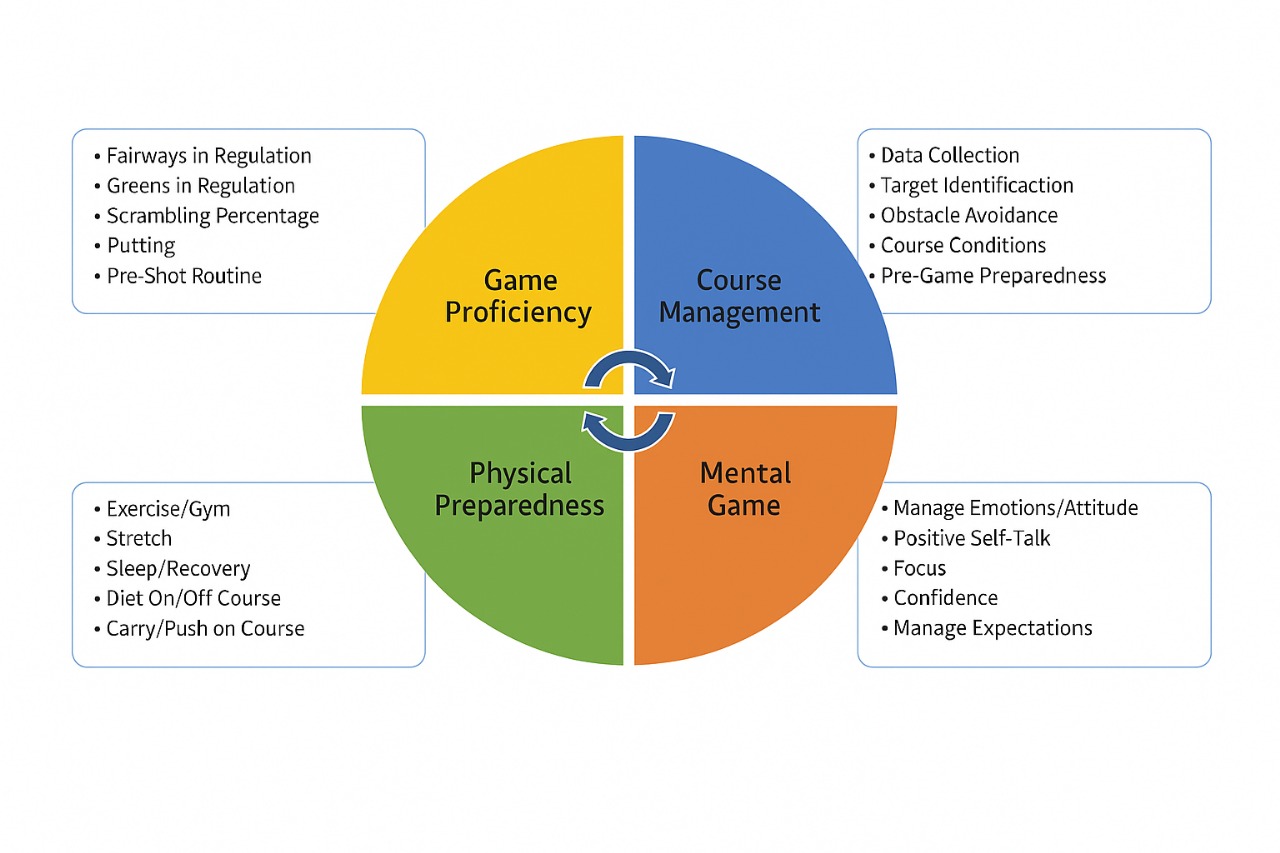
Game Performance Assessment (GPA) is a self-assessment tool designed to evaluate, analyze, and score your personal golf skills across four key areas: Golf Proficiency, Course Management, Mental Game, and Physical Preparedness. The purpose of GPA is to help you identify your strengths and highlight areas for improvement. You then will be able to create a customized plan to elevate your overall performance as a golfer.
GPA consists of five questions per category, totaling 20 questions across the four key areas. For each question, you'll assign yourself a score from 1 to 5, with 1 representing a low skill level and 5 representing a high skill level. To reflect your abilities more precisely, fractional scores (e.g., 2.5, 3.75) are encouraged when you feel your skill falls between whole numbers. Once completed, your scores will be tallied for each of the four categories, and a total overall score will be calculated.
Upon completion of GPA, you'll receive a personalized report that outlines your strengths and areas for growth based on your self-assessment. This feedback serves as a roadmap to refine your skills and optimize your game, tailored specifically by your inputs.
For the best and most accurate results, it is essential to answer questions honestly and use verifiable data and avoid guessing, as inaccurate or unsupported responses will compromise the reliability of the outcome.
Instructions & Requirements
To effectively use the Game Performance Assessment (GPA), you'll need to determine your personal scoring average, a key metric distinct from your USGA Handicap Index. While the Handicap Index reflects your potential ability adjusted for course difficulty, your scoring average is simply the mean of your actual 18-hole scores over a series of rounds. Calculating an accurate scoring average requires a sufficient sample of rounds to account for performance variability, course challenges, and playing conditions.
Here's how to do it:
Sample Size Guidelines
- 5-10 Rounds: A bare minimum for a rough estimate. Fewer than 5 rounds may skew results due to outliers (e.g., an exceptional or poor performance).
- 10-20 Rounds: The practical sweet spot for most golfers. Ten rounds offer a quick benchmark, while 20, aligned with the USGA's use of the best 8 out of 20 for handicaps, provide a more reliable average reflecting consistency and recent form.
- 15-30 Rounds: Ideal for statistical reliability. This range smooths out anomalies and captures your typical performance across diverse courses and conditions.
Steps to Calculate
- Record Your Scores: Track your total 18-hole scores for each round (unadjusted for handicap).
- Select Your Sample: Choose a set of rounds (e.g., your last 10 or 20).
- Average Them: Add the scores together and divide by the number of rounds. For example, if your last 10 scores are 82, 78, 85, 80, 79, 88, 84, 81, 83, 77: Total = 817 ÷ 10 = 81.7 (your scoring average).
Factors to Consider
- Consistency: Wide score fluctuations (e.g., 75 to 95) suggest a larger sample (20-30 rounds) for accuracy.
- Course Variety: Playing different courses versus a single layout may require more rounds to balance difficulty and conditions.
- Purpose: Casual tracking might need only 10 rounds, while competitive goals or GPA precision benefit from 20+.
For a quick GPA baseline, start with your last 10 rounds. As you log more scores, refine your average with a 20-round rolling sample for a clearer picture of your game. Knowing your scoring average sets the foundation for assessing your skills in Golf Proficiency, Course Management, Mental Game, and Physical Preparedness.
Getting Started
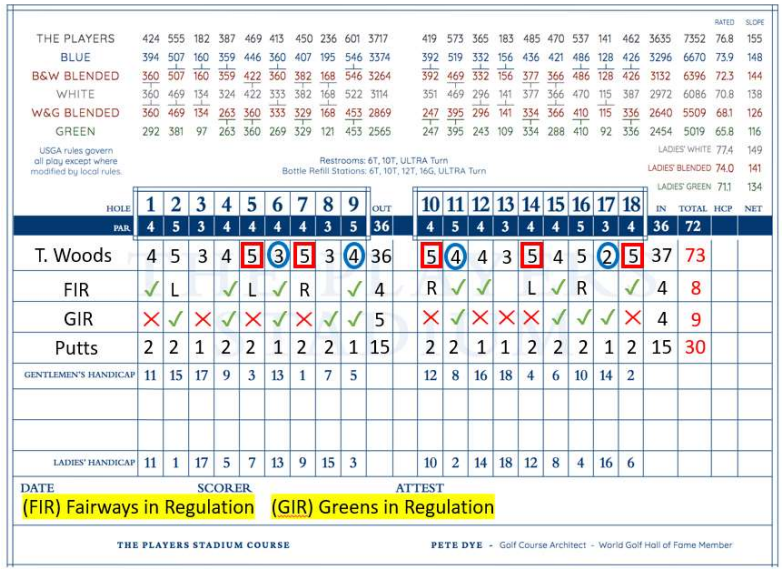
If you're not using a Data Collection Golf App, tracking your basic golf stats is still simple with just a scorecard. For each hole, jot down your score, then mark whether you hit the fairway, reached the green in regulation, and how many putts you took. At the end of your round, add up your total fairways hit, greens in regulation, and putts to get a clear picture of your performance. This straightforward method lets you analyze your game, no tech required!
Tracking these stats manually provides a clear snapshot of your performance—driving accuracy (FIR), approach play (GIR) and putting efficiency—without needing an app. Use these totals as a baseline for your Game Performance Assessment (GPA) or to monitor progress over time.
Key points to track on your scorecard:
- Basic score: Write down the number of strokes taken on each hole to calculate your total gross score.
- Fairway hits (FIR): Mark a box or checkmark next to each hole where you hit the fairway.
- Green in regulation (GIR): Indicate if you reached the green in the standard number of strokes for that hole.
- Putts per hole: Record how many putts you took on each hole.
- Calculate totals: Count the number of fairways hit, greens in regulation, and total putts across all holes.

Example Scorecard Snippet